Bring the operation together
Keep the major parts of the pest-control business in one operating environment instead of scattering the day across unrelated tools.
Your company is one business. ProPest Hub is being built as one connected business operating system for the day-to-day operation—so customers, scheduling, field work, employees, records, compliance, business activity and ProPest Hub AI do not have to live in separate operational silos.
Created and built from the ground up by a pest-control operator with decades of hands-on industry experience.
A private, operator-to-operator look at ProPest Hub—not a high-pressure generic software sales demo.
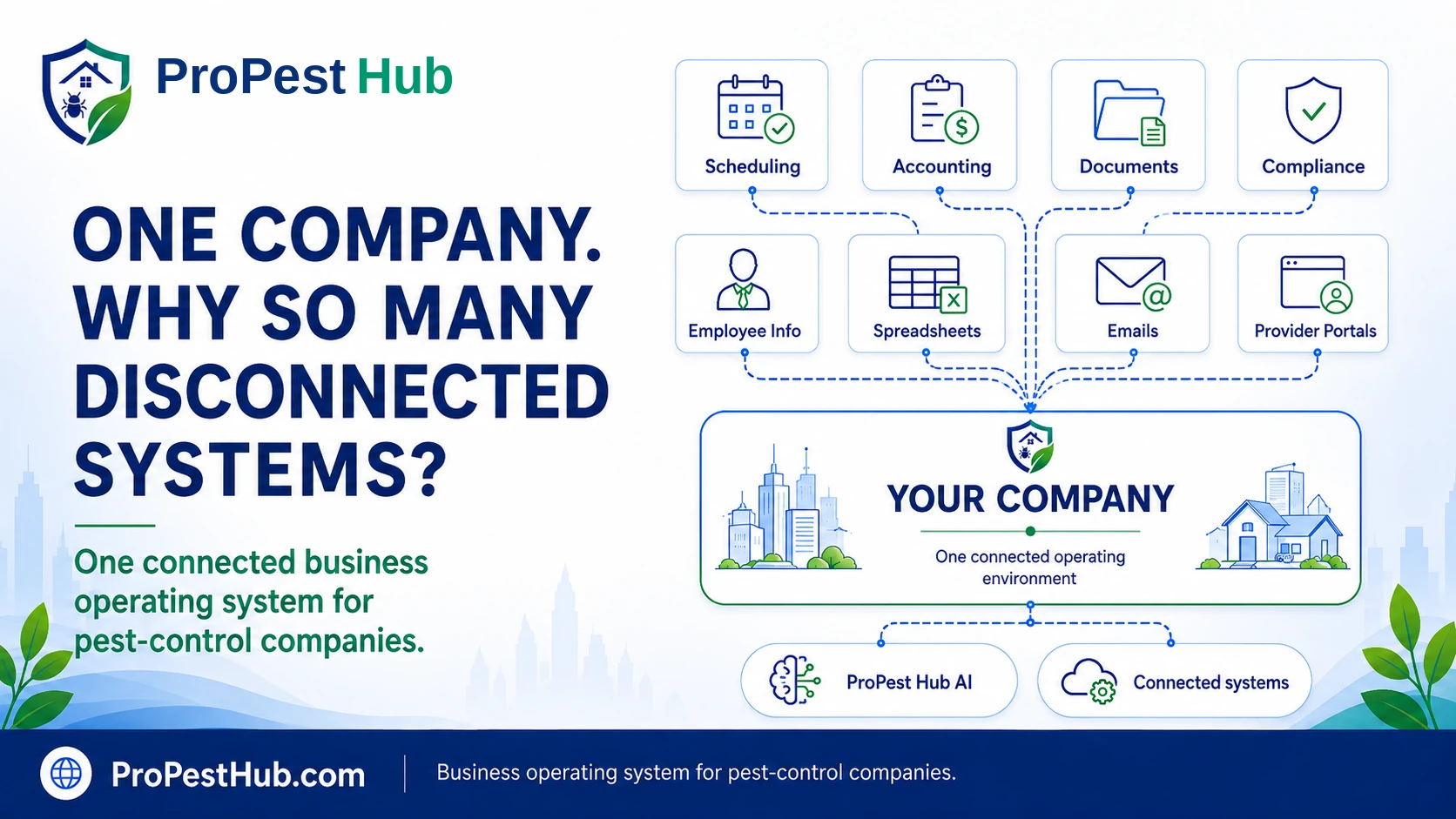
ProPest Hub is being built first for companies where the owner or management team is still close enough to daily operations to personally feel the cost of disconnected systems, duplicated work and scattered operating history.
ProPest Hub grew out of the day-to-day operating problems encountered while running Dunn Environmental Services. The product direction starts with the work an operator actually has to manage—not a generic software template looking for an industry.
When one company runs through separate applications, spreadsheets and workarounds, the team spends time carrying context from one place to another instead of simply moving the work forward.
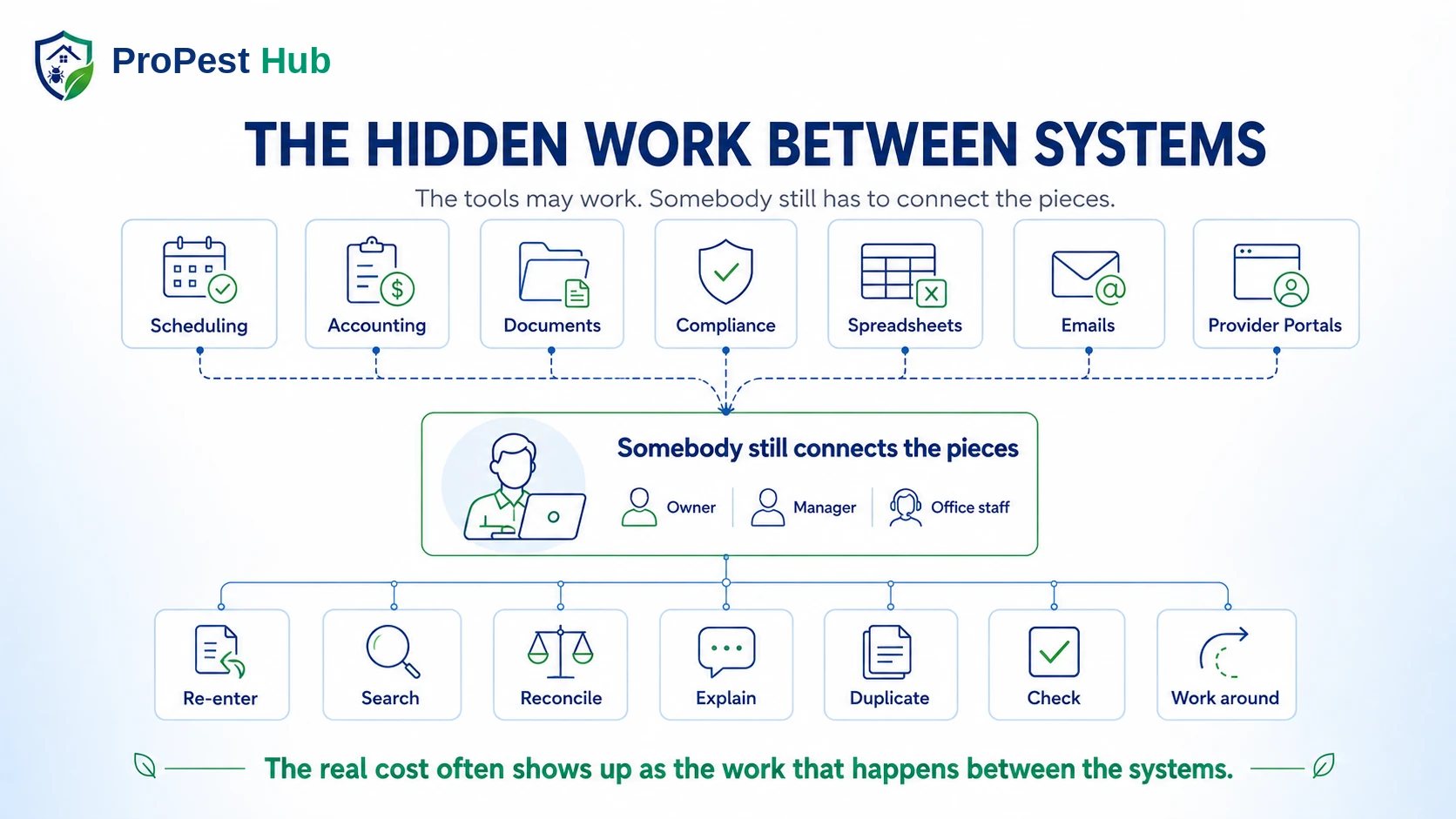
The goal is to keep the operation connected: the customer, the property, the scheduled work, what happened in the field, the records that document it, the people responsible for it, and the business context around it.
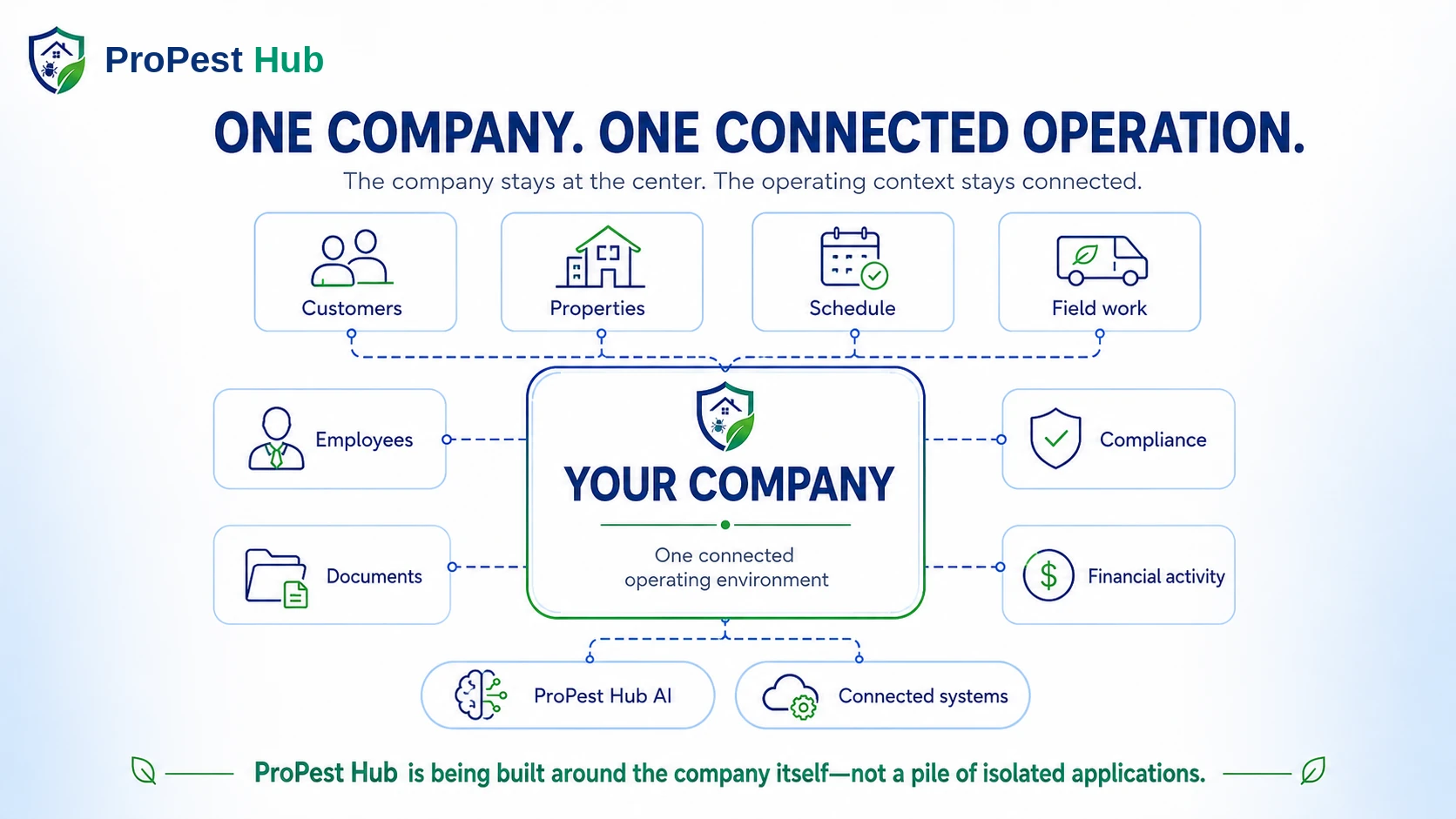
Keep the major parts of the pest-control business in one operating environment instead of scattering the day across unrelated tools.
What happens in the office and field can stay connected to the customer, property, service and records that give it context.
Authorized users can ask for help within the work they are allowed to see—without making AI the source of facts that still require real records or human confirmation.
After the short welcome, browse at your own pace. Open ProPest Hub AI whenever you have a question. For hands-free help while you explore, turn on Conversation Mode—it will automatically minimize into the compact AI bar and stay available while you scroll. The full guided tour remains available, but it starts only when you choose it.
Start with three hands-on workflows that show how ProPest Hub connects field work, regulated records and property history. Then explore the full interactive demo library if you want to go deeper.
See how a service stays open when a required current-visit fact or application record is still missing instead of allowing “Done” to outrun the evidence.
Move from inspection facts toward the regulated document workflow and see why the underlying evidence remains connected to the official report.
Build a property finding and follow the history forward so the next visit starts with context instead of another disconnected note or spreadsheet.
See role-aware help inside the work.
Try a schedule-change decision.
See a point-in-time Start Service check.
Follow a visit from Start Service to Finish Service.
See how a missing current-visit fact stays visible.
Build a property finding and follow-up history.
Try the inspection-facts-to-official-document workflow.
See distinct operating context inside one company.
Keep follow-up connected to the original relationship.
Switch to Technician, then ask for today’s workflow. The sample keeps the answer inside the employee’s authorized work and teaches the sequence instead of opening unrelated company information.
The authenticated product now includes Teach Me ProPest Hub, Owner Guided Setup, screen-aware guidance and a minimized AI working state. This public tour never receives private company data.

Pick a training action, or ask a free-form question about the sample company.
Imagine an urgent Termite inspection has just entered the day. Try assigning it to Maya, then Marcus, and see how route planning and technician eligibility can work together while the office decides what fits best.
The current product carries department context through jobs, recurring work, Dispatch, reporting, products/materials, compliance context and ProPest Hub AI. This demonstration uses hypothetical sample data only.
Try Start Service while the sample device is inside the approved service radius, then try the same action outside the radius. The demo records a point-in-time verification result rather than simulating continuous tracking.
This demonstration uses hypothetical location data only. In the authenticated product, on-site verification uses the company’s approved service-location rules at the defined service event.
The daily vehicle pre-trip is already complete in this sample. Open the assigned job, start service at the property, record the current-visit treatment facts, review them, and complete the service. For this Florida pesticide-treatment example, the connected application record is then filed with the customer history and is already available to authorized office users.
Marcus · TechnicianToday · assigned workQuarterly Pest · 11:00 AM · Sample Residence
This is a hypothetical Florida pesticide-treatment example. In the current authenticated product, applicable Florida Structural treatment completion is tied to the current visit’s application/compliance evidence. A true no-pesticide visit uses a separate factual completion path.
Enter hypothetical field notes and, if you would like, include a conflict. Supported facts can carry forward while the conflicting fact remains visible for human review, and the workflow can then continue to the verified official FDACS-13645 path.
Enter your own hypothetical field notes. ProPest Hub AI fills only supported facts, preserves your manual edits, leaves missing facts blank, and sends contradictions to AI Reading Review instead of guessing. Nothing touches real company, customer, employee, or production records.
This is the written record of what could not be inspected. Leave an area blank if it was fully accessible.
Select a department to see how the sample company changes its work, staffing and operating attention without splitting everything into separate systems.
This sample treatment is intentionally missing one fact: the amount applied. Press Complete Service and see how ProPest keeps the visit open, points out what still needs attention, and leaves the real treatment amount for the technician to enter and confirm.
I can explain what is missing, but I cannot invent a current-visit treatment fact for the technician.
This demonstration uses hypothetical treatment data only. It is not a regulatory record and does not save anything to a real company account.
Record a site condition, move it through corrective action, and watch the timeline and binder build from the same property state so the history is easier to revisit later.
When you save the Property Compliance Profile or IPM Program above, the saved record appears here immediately. This proves what the demo retained instead of relying on a success message alone.
Create a sample warranty callback from a completed visit, then record a renewal event for the linked service agreement. Watch the history stay connected so the next event keeps the context of the original relationship.
In the current authenticated product, warranty callbacks are linked scheduled jobs and are forced to No Charge / $0; renewal events extend the existing agreement lifecycle with retained history.
Getting ProPest Hub ready means configuring the business, connecting approved services, setting departments, preparing employee access, reviewing inventory and knowing what is actually ready. Guided Setup keeps those operating pieces visible and organized so the company can see what is complete, what remains, and what needs attention next.
Each option follows a different everyday situation. The first three gently walk the sample workflow for you, while the interactive tour lets you take over, ask questions, explore, and move on whenever you are ready.
See what happens when a technician reaches the end of a treatment and one required current-visit fact still needs attention.
Follow a small change in the day as the office considers who can take the work and the technician later starts service at the property.
Follow one commercial visit from technician guidance through job-site verification, field records, a property finding, corrective action and the history the customer may want to revisit later.
Walk through a technician’s assigned residential visit from opening the job and verifying Start Service through recording the visit, reviewing the details, and completing the service.
Walk through nine sample workflows, ask ProPest Hub AI questions in Conversation Mode, try the demonstrations yourself, and move chapter by chapter whenever you are ready.
ProPest Hub launches in Florida first because Florida operators already balance WDO, field application records, workforce requirements, vehicle/pre-trip controls, customer information duties and changing regulatory authority. The product is designed to bring those responsibilities closer to the day-to-day workflow while keeping state-specific requirements clearly separated.
Review supported inspection facts and generate the actual FDACS-13645 path from the WDO workflow—not a lookalike form.
CURRENT SOFTWARECurrent Florida treatment completion ties the job closeout to verified current-visit application evidence.
CURRENT SOFTWAREThe canonical technician workflow starts with the daily vehicle pre-trip before driving or first field work, then keeps current-visit evidence and Complete Service in order.
CURRENT SOFTWAREThe controlled Florida Regulatory Pack can check curated official sources for review signals without silently rewriting your company records or compliance logic.
CURRENT SOFTWAREProPest Hub started with a working pest-control company and the everyday situations that show up in the office, in the truck, at the customer’s property, and after the route is finished. The goal is to build a connected business operating system around the way pest-control companies actually work—not another isolated app added to the pile.
These are only a small sample. Pest-control companies deal with hundreds of decisions, handoffs, records, follow-ups and questions every week. ProPest Hub is designed to connect more of those moments inside one company workspace so the team spends less time rebuilding context between separate processes.
Department-aware scheduling, recurring work and Master Dispatch keep assignment, route order, duration and technician eligibility connected.
Customer profiles connect properties, contacts, access notes, documents, service history, upcoming work and balances.
The Document Center organizes company, workforce, customer, service, financial and official-form records into retrievable groups.
Products, materials, truck quantities, department availability, low-stock visibility and purchasing stay connected to field use.
Authorized users can work with paid work, outstanding balances, invoices, expenses, mileage and business reporting.
People & Access separates roles, permissions, departments, HR authority and delegated administration ceilings.
Florida application records, pre-trip gates, field compliance, devices and Complete Service integrity keep evidence inside the operating workflow.
Employee Messages, notifications, customer email workflows, AI voice/microphone interaction and live refresh paths keep communication attached to the work.
Property profiles, IPM, findings, corrective actions, evidence, binder/timeline views and inspection packages preserve the property story.
Established pest-control and field-service platforms solve important parts of the business in different ways. ProPest Hub’s direction is to keep the office, field, records, permissions, compliance and follow-up connected to the same operating story rather than treating each moment as an isolated task.
| What matters | Common generic approach | ProPest Hub |
|---|---|---|
| Employee questions | Help documentation, support, training sessions, or manager answers | Role-aware ProPest Hub AI can teach the authorized workflow where the employee is already working |
| Routing + assignment | Optimize the map, then handle qualifications separately | Route planning can consider travel while department eligibility still controls who should receive the work |
| Technician accountability | Continuous location tracking is a common option in field-service software | Point-in-time On-Site Service Verification at defined job actions without making all-day tracking the current model |
| Service completion | Job status and supporting field records may be handled as separate tasks | Protected Complete Service can keep an applicable visit open until required current-visit evidence is present and confirmed |
| Departments | One shared schedule with tags, teams, or manual conventions | Configured business lines carry department context through assignment, reporting, materials, compliance and AI context |
| Callbacks + renewals | Another appointment and another reminder | Callback jobs can stay linked to the completed visit while renewal events extend retained agreement history |
| Commercial follow-up | Notes, files and corrective-action communication spread across places | Property profile, findings, corrective actions, verification, binder views and timeline stay inside the same property story |
| Florida regulated work | Forms, notes and reference material handled as separate tasks | Field evidence, WDO review and official-document paths stay closer to the workflow that created the facts |
Competitor products vary and many established platforms are strong in these categories. This comparison describes common field-service patterns and ProPest Hub’s current workflow direction; it is not a claim that every competitor lacks every capability.
Outgrowing current software should not mean abandoning years of operating context. The Universal Migration & Data Conversion Center is being designed to bring information from multiple authorized sources into a controlled staging process where mappings, relationships, duplicates and business totals can be reviewed before Owner-approved migration into live ProPest Hub records.
Established companies may have customer, service, accounting, workforce and document history in different systems. Migration is designed around that multi-source reality.
Analyze, map and review information away from live operating records so uncertain relationships and duplicates can be resolved before commit.
Reconciliation and explicit Owner approval are part of the migration path rather than treating an uploaded file as automatic authority to rewrite the company.
Imported history is designed to retain source context so questionable records can be traced and reconciled instead of becoming anonymous data.
A connected operating system does not have to pretend every outside business service disappears. ProPest Hub is being designed to connect appropriate systems around the company so information can support the operation without creating another isolated silo. That direction includes accounting, communications, calendars and payments, while Social & Marketing Operations now has a current controlled-release workspace inside ProPest Hub.
Florida is the first deeply implemented regulatory profile. ProPest Hub combines current field/workforce workflows with a controlled Regulatory Pack built from curated Florida and federal official sources, while keeping current-source intelligence separate from automatic changes to company rules, forms or records.
The customer-facing model is simple: each pest-control company works inside its own secure company workspace while ProPest Hub manages the platform around it. Within that workspace, access stays aligned to the person’s company, role, permissions, department scope and authorized responsibilities.
A technician does not gain Owner-level revenue, billing, HR, or unrelated company access simply because ProPest Hub AI is available inside the operating system.
ProPest Hub AI follows the employee’s company, role, permissions, and authorized work instead of becoming a shortcut around normal access boundaries.
Each company operates in its own protected workspace, and users are limited to the company information they are authorized to access.
Employee-file authority can be granted separately from password administration, role changes, suspension authority, backups, and Owner settings.
User-wide suspension and termination controls are designed to apply access changes across protected requests rather than relying on an older device session to expire on its own.
Important security and regulated operational actions remain available in reviewable activity history instead of disappearing as soon as the screen changes.
The current training contract treats operational order as part of the truth. For technicians, the workday begins with the daily vehicle pre-trip before driving or first field work, then moves through the assigned job, current-visit records, review and protected Complete Service.
This public ProPest Hub AI guide demonstrates the kind of day-to-day assistance the platform is designed around: helping people understand operating situations, find the relevant workflow and see how ProPest Hub approaches the problem. The authenticated ProPest Hub AI experience can work within the signed-in employee’s authorized company context.
Tell the guide about something you would like to make easier in your operation. It will explain the current product behavior and point you toward the most relevant demonstration.
Voice input is available on supported devices and browsers. The public guide does not have access to a company’s authenticated records.ProPest Hub is still in controlled pre-launch development. We are working directly with a small number of Florida pest-control operators who want a private look at the platform and are willing to give practical, operator-level feedback.
A design partner can privately review ProPest Hub without replacing the company’s current software.
Selected design partners may later be invited into a controlled paid operational pilot after the necessary product, security and pilot-readiness gates are complete.
See ProPest Hub privately, operator-to-operator. This is a focused look at the problems your company is trying to solve—not a generic high-pressure software sales presentation.
See how the connected operating-system approach works, what is current, and how ProPest Hub fits an established pest-control company.
It means ProPest Hub is being designed around the operation of the company itself rather than one isolated function. The goal is to reduce the fragmentation created when one pest-control business has to rely on a patchwork of separate applications, spreadsheets, systems and workarounds just to keep the day moving.
The Universal Migration & Data Conversion Center is designed for established companies that cannot simply start over. It stages authorized information for mapping, relationship review, duplicate decisions and reconciliation before Owner-approved migration. Named provider adapters are described according to their actual certification state.
Yes. The current authenticated product includes Teach Me ProPest Hub and role-aware, screen-aware training. The Owner also has a Guided Setup/readiness workflow that checks saved setup information before representing a step as ready.
The current Florida Structural completion workflow is designed to keep an applicable treatment open until the technician has recorded and confirmed the required current-visit facts and the linked application/compliance evidence is verified. A true no-pesticide visit uses a separate factual completion path.
No. ProPest Hub AI is integrated into the ProPest Hub operating system to assist authorized people throughout their day-to-day work. The experience is shaped by the signed-in employee’s company, role, permissions, assignments and authorized records so ProPest Hub AI can provide useful assistance without becoming a shortcut around company authority.
Yes. The current controlled-release product includes Social & Marketing Operations for campaign planning, ProPest Hub AI-assisted draft preparation, human review and approval, social-calendar scheduling, and manual publication evidence. Direct automatic publishing through individual social-network provider APIs is not yet certified, so ProPest Hub does not present provider-side delivery as live until that specific connection is verified.
Yes. The current Florida WDO workflow can generate the actual FDACS-13645 state PDF with the report details filled in after the inspection is completed and reviewed.
No. A technician should not gain Owner-level financial, HR, or unrelated company visibility simply by asking ProPest Hub AI. ProPest Hub AI is designed to follow the same company and permission boundaries as the application.
ProPest Hub is launching in Florida first. The product is designed to expand with verified state-specific rule packs, but we do not claim current nationwide regulatory coverage. New states are intended to be added only after the applicable requirements are verified.
Yes. The field experience is designed for modern phones, tablets and desktop devices, including microphone interaction with ProPest Hub AI where the device or browser supports it.
No. Software can structure workflows, require configured records, and preserve evidence, but every company remains responsible for licenses, labels, laws, regulations, training, and professional judgment.
Request a private 20-minute Operator Preview. Florida operators who appear to be a strong fit may continue the conversation as design partners, and selected design partners may later be invited into a controlled paid pilot after the required readiness gates are complete.
ProPest Hub was created and built from the ground up by a pest-control operator with decades of hands-on industry experience. Start ProPest Hub AI for a brief welcome, then explore at your own pace. For hands-free help as you scroll, turn on Conversation Mode after the welcome—it will minimize automatically and stay available for questions.
The opening is brief. No guided tour starts automatically.
Marketing should not become another disconnected part of the business.
Campaign planning, content workflow, ProPest Hub AI-assisted drafting, human review and approval, social scheduling, and publication history can now live inside the same operating environment as the rest of the company—so marketing does not have to become another separate pile of tools, approvals and forgotten context.
Plan campaigns where the company already operates
Authorized users can create campaign plans, organize the objective and audience, and keep the marketing workflow inside the company workspace.
Let ProPest Hub AI help prepare the draft
ProPest Hub AI can prepare proposed social content from authorized campaign facts and the user’s brief while leaving missing real business facts for people to supply and verify.
Keep human approval separate from drafting
Marketing Operations and Social Publish / Approval are separate authorities, so the ability to create content does not automatically become permission to approve or publish it.
Schedule approved content and keep publication history
Approved content can be placed on the ProPest Hub social calendar, and an authorized user can record the public post URL after manual publication so the company retains the evidence and history.